Satisfactory How to Join a Server: Difference between revisions
Jump to navigation
Jump to search
(Created page with "== How to Join a Satisfactory Server == The official method to join a Satisfactory server is to locate your game server on the official server list within the game. Simply t...") |
|||
| (One intermediate revision by the same user not shown) | |||
| Line 3: | Line 3: | ||
The official method to join a Satisfactory server is to locate your game server on the official server list within the game. | The official method to join a Satisfactory server is to locate your game server on the official server list within the game. | ||
# When in game click on the Server Manager section on the left hand side. | |||
# Then click the add server option at the bottom. | |||
# From there grab your ip:port from the server panel to add into the confirmation box. | |||
# Click your server once you see it listed and follow the authentication process. | |||
[[File:Satisfactory_image. | |||
[[File:Satisfactory_image.jpg|none|800px|]] | |||
Latest revision as of 12:34, 20 December 2021
How to Join a Satisfactory Server
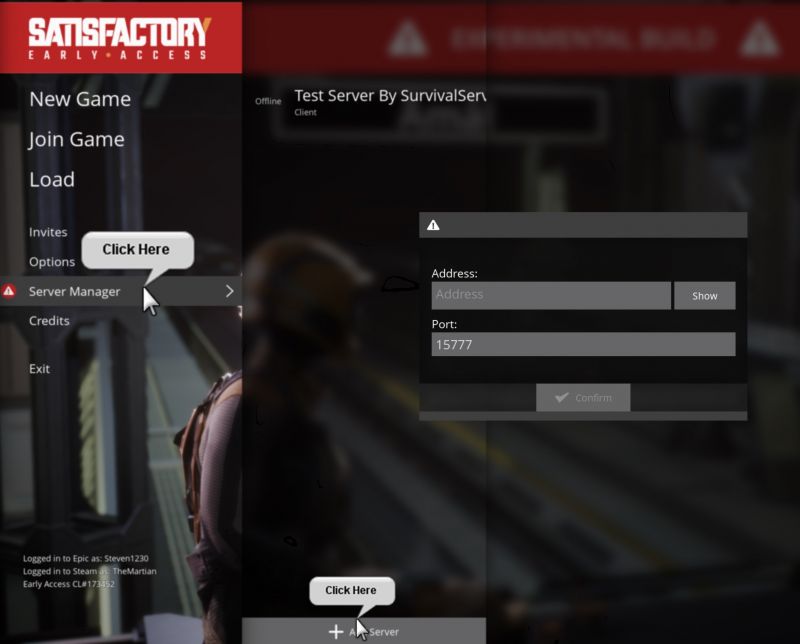
The official method to join a Satisfactory server is to locate your game server on the official server list within the game.
- When in game click on the Server Manager section on the left hand side.
- Then click the add server option at the bottom.
- From there grab your ip:port from the server panel to add into the confirmation box.
- Click your server once you see it listed and follow the authentication process.
